Speed Improvements
Progress comparison
See exactly which characters you improved on over time.
Touch typing practice for programmers
Learn to type without thinking about the syntax
Reduce Friction • Improve Flow
TypeQuicker supports every programming language and development tool. Practice typing everything from Bash scripts to SQL queries
The most advanced stats of your typing
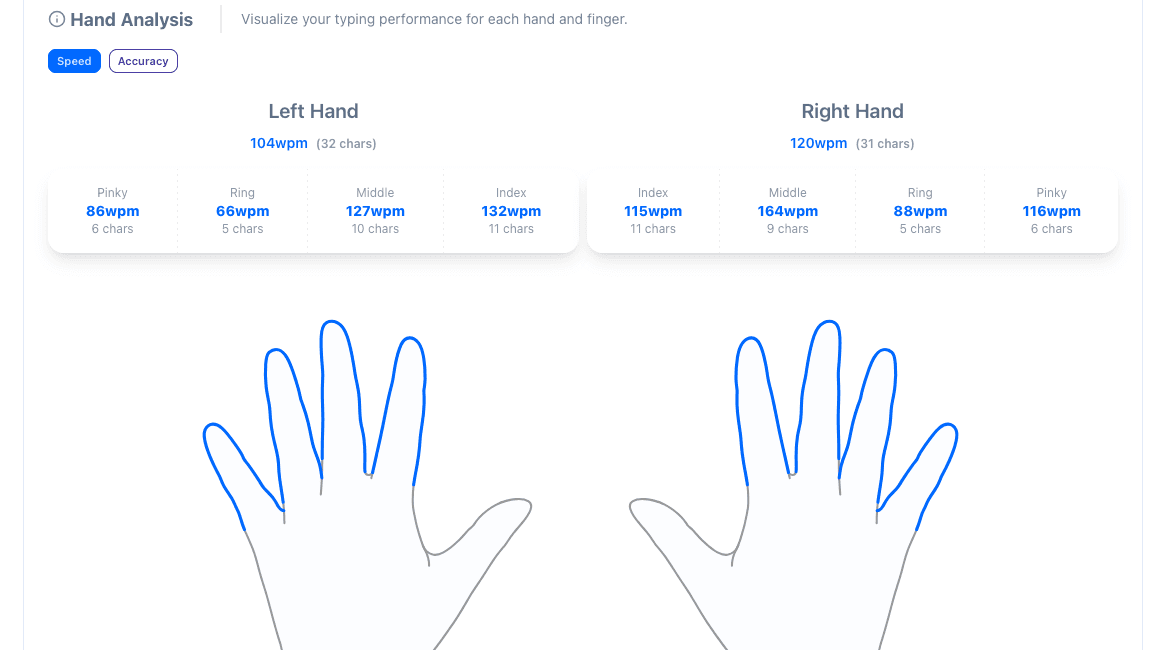
Detailed analysis for each hand and finger
Our real-time hand and finger positioning guide makes it easy to learn 10 finger typing
Many typing modes.
Everything from text snippets to code
Powerful AI features that adapt to your learning style and help you master touch typing faster than ever before.
I want to pratice typing...
AI-powered typing mode that generates text focusing on your weak points
Select a character sequence, word, hand or finger that you want to improve and our AI will generate natural text that targets it
Prompt and type. Practice typing any content you want with our AI-powered typing practice
Choose from 40+ popular themes designed
and many others
Coding typing test & practice for programmers.
Practice typing with real code
Track progress over time, identify weakpoints, measure hand and finger gains, and build consistency with clear activity history.
Speed Improvements
See exactly which characters you improved on over time.
Needs Improvement
Speed
22wpm
342 samples
29wpm
186 samples
35wpm
214 samples
TypeQuicker uses sophisticated algorithms to identify exactly which characters you should prioritize improving next.
Hand Improvements
Last 90 days
Track exactly how each hand and finger improves.
Track your activity and build consistency.
Improve your typing speed while typing real code.
From Rust code snippets to git commands. TypeQuicker suppports every programming language and tool.
Learn a language's syntax while improving your typing. Real code snippets from real open-source projects.
function filter(arr, fn) { const result = []; for (let item of arr) { if (fn(item)) result.push(item); } return result;}Our real-time hand and finger positioning guide makes it easy to learn touch typing while practicing typing code.
Never look down at your keyboard again
Choose from a large collection of themes or create your own. Every pixel of the site adheres to the theme's colors.
Try it now - click on any of the themes below
TypeQuicker is a all-in-one typing application. Besides code, you can also practice typing text, compete in daily challenges and much more
Powerful AI features that adapt to your learning style and help you master touch typing faster than ever before.
I want to pratice typing...
AI-powered typing mode that generates text focusing on your weak points
Select a character sequence, word, hand or finger that you want to improve and our AI will generate natural text that targets it
Prompt and type. Practice typing any content you want with our AI-powered typing practice